Founder’s Personal Security Checklist, Part 1: Passwords and MFA
Intro
As a founder, you should not start with firewalls or fancy threat intel. You should start by securing yourself, and you should have the items covered in this series consistently understood; otherwise, it’s a matter of time before you are exposed.
When you run a company, if someone can reset your passwords, intercept your SMS codes, or trick you into logging into a fake page, it doesn’t matter how “secure” your product is. They can walk into your email, cloud accounts, banking, exchanges, and even steal your company’s domains.
The first part of this series of posts focuses on securing the founder’s identity:
- Password hygiene: Password managers, entropy, and usual ways to compromise;
- MFA internals: Why one is better than the other.
1. Password hygiene
1.1 Safe and pragmatic approach
Unfortunately, password leaks are common nowadays. If you Google “Passwords leaked in 2025,” you will find plenty of stories; TL;DR: you should never reuse passwords.
What you can do to simplify your life while juggling hundreds of SaaS applications. It’s a combination of
- common IdPs (e.g., logging in with Google)
- and a solid password manager to remember your randomly generated passwords.
For the IdPs - always review the authorization scopes. It’s common when you allow access to your name and email address, but red flags can include access to your email content or your Google Drive.
For password managers, you can go with an online or an offline one. The threat model for online password managers is broader than that for local solutions, and it still allows plaintext passwords to be compromised by factors beyond your control. To help you choose, we offer you to consider a simplified model of attack vectors that can compromise your credentials:
- Local Password Manager
- malware on your device: Trojan, browser extension that is compromised, etc
- Stolen backup with a subsequent brute force of the password. It can be neglected with a good master password.
- Cloud Password Manager
- Attacks on the backend and architecture of the cloud password manager solution
- DNS
- Supply chain
- Insiders
- Etc.
- Plus the malware on your device 🙂
- Attacks on the backend and architecture of the cloud password manager solution
Local password manager
The standard choice is the venerable KeePass, which has various GUIs. Downside: no easy way to share secrets; you are in charge of the backups.
For backups, you can periodically copy your encrypted password database to your cloud storage to ensure you can recover if you lose your local storage.
Cloud Password Manager
There’s plenty of choice. We can recommend 1Password and BitWarden, which have similar architecture. 1Password has the better UX, but it is more expensive.
NB! There have been data leaks from some poorly designed online password managers (not the two mentioned above), so do your own research on known breaches when you are making a choice.
1.2 Where to keep passwords?
We discourage you from storing both 2nd-factor authenticators and Passwords in any online password manager, despite its convenience, because it makes them a single point of failure.
What about keeping passwords in the browser?
Cybercriminals often instruct the malware to extract saved passwords from browsers, increasing the risk of credential theft. Password managers, in turn, are a harder nut to crack than the usual browser, which will buy you extra time and protection if you are compromised.
Plaintext passwords should never be in:
- screenshots;
- chats, messengers;
- stickers, notebooks, unless stored in a safe place (e.g a real safe, bank vault, etc). NB! You should discourage this type of behavior from your employees whenever you see it. This will create a good habit and culture in the company. The fewer places your passwords exist, the smaller your attack surface is.
1.3 Building the passwords you need to remember
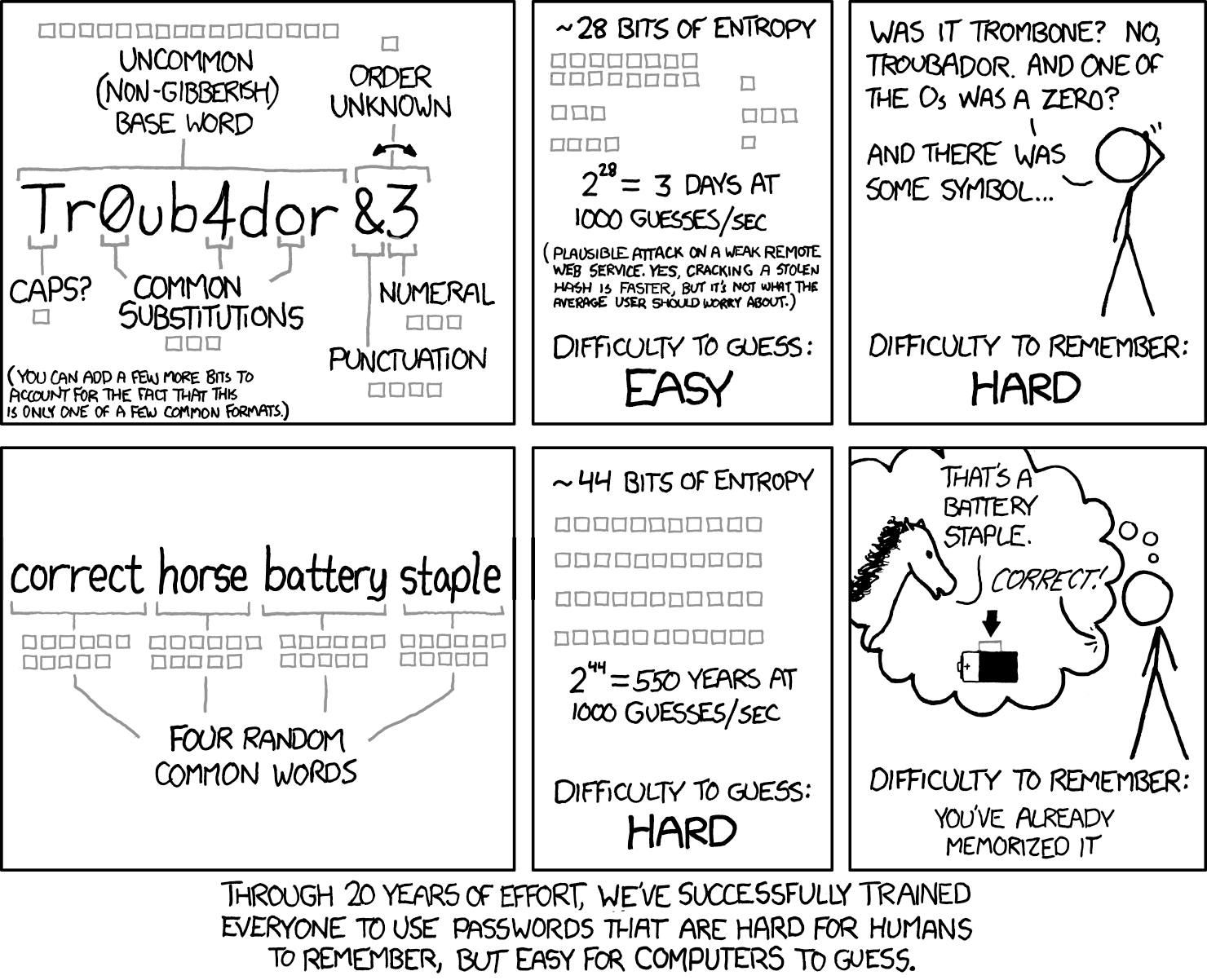
You will still periodically need a few strong passwords that you have to remember. E.g. a string and unique master password that never appears anywhere else, or your system login credentials. There’s a great xkcd comics describing a good way to build the strong passwords:
 Credit:xkcd
2. MFA is a must
If the online service/SaaS/platform does not have MFA - avoid it. Start with:
- primary email;
- Apple ID / Google account;
- password manager;
- bank accounts and exchanges;
- Domain Registrars;
- Infrastructure/Hosting logins.
2.1 Types of MFA
TL;DR: Hardware Passkeys >= Hardware Security Keys > Software Passkeys >= TOTP (e.g. Google Authenticator) > > Email TOTPs >= SMS
All of these are “something you have,” but they differ in how hard they are to steal or replay.
- Hardware passkeys sit at the top because they’re FIDO2 credentials stored in secure hardware and unlocked with a local PIN/biometrics, and they’re bound to the real website origin - so even perfect phishing can’t replay them.
- Hardware security keys are almost as good, providing the same origin-binding, but are often used only as a second factor rather than fully replacing passwords.
- Software passkeys rely on the OS’s secure enclave and can sync across devices, which is convenient but slightly broadens the attack surface, so they’re still better (and more phishing-resistant) than classic codes but not as secure as hardware.
- TOTP apps (Google Authenticator, etc.) are weaker because the 6-digit codes can be phished or keylogged and reused.
- Email TOTPs are worse since they depend entirely on your inbox security.
- SMS is last because of SIM-swaps, SS7 issues, number recycling, and delivery problems.
2.2 Backup codes stored offline.
Most critical services let you generate backup or recovery codes. These are “break glass” options if you lose your phone or token. Treat them like spare keys:
- generate them;
- print or write them down;
- store offline in a safe place (not in screenshots or cloud notes).
Conclusion
In the next part, we’ll look at next real-world risks:
- phishing protections - how to make phishing emails and messages much less likely to succeed;
- SIM-swap attacks - what they are and what you should do to protect against them.
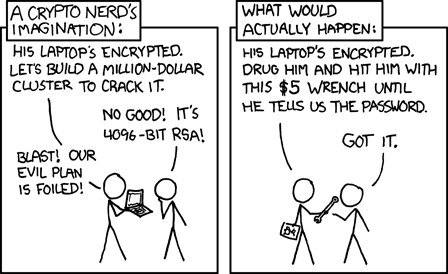
Stay safe, and always keep in mind that cracking the password is usually not the most straightforward solution:
 Credit:xkcd
Author: Dmitry Slinkov